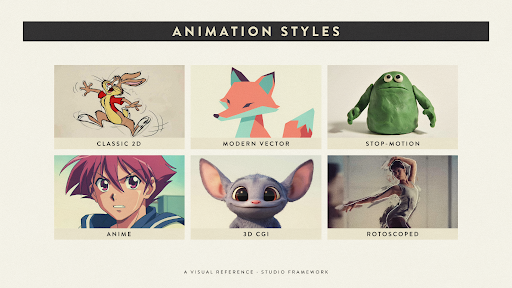
The types of animation styles available today can make a simple video brief unexpectedly messy.
It often starts with a reference. Someone likes a polished 3D product film. Someone else wants friendly cartoon characters. Another person suggests motion graphics because the message includes data. All three ideas may be good, but they may not belong in the same video.
The style should not be chosen first.
Before discussing colors, characters, software, or camera movement, decide what the audience actually needs to see. Are they following a person, examining a product, learning a process, or watching a short campaign message?
That answer usually narrows the choices quickly.
First Decide What Carries the Story
Most animation projects are led by one of three things:
A person or character.
A physical object.
Information or a process.
Some videos mix all three, but one normally matters most.
If a viewer needs to understand how a customer feels, character work may help. If they need to see the inside of a device, 3D is more useful. If they need to follow a workflow, motion graphics will probably explain it faster.
This is the practical way to think about the different types of animation and their uses. Each style gives the audience a different kind of information.
When People and Everyday Situations Matter
A lot of business messages become easier to understand once a person appears.
Imagine a manager switching between four dashboards. A patient waiting for instructions. A parent trying to choose a learning app. These are not technical scenes. They are human situations.
2D Animation
2D animation handles this kind of storytelling well.
The artist can create offices, homes, classrooms, cities, or imaginary spaces without needing actors or locations. Expressions can be subtle or exaggerated. The style can feel warm, formal, playful, or restrained.
A healthcare video may use calm movement and simple facial expressions. A children’s brand can push color and comedy much further. A financial company might use flatter shapes and less character acting.
An explainer video company will usually decide how much detail the audience needs. A short service video may only require clear poses and a few expressions. A longer story may need stronger acting, lip sync, and more developed scenes.
The main advantage is control. Every visual can be shaped around the message.
Character Animation
Character animation is useful when behavior carries the idea.
There is a difference between showing a worker using old software and showing the same worker pausing, sighing, searching through several screens, and finally giving up. The second version lets the viewer feel the problem.
That is why character-led work appears often in HR, education, healthcare, customer support, and service marketing.
A mascot can also become part of the brand. It may appear in onboarding, social posts, help videos, and campaign content. Over time, viewers start to recognize it.
Characters are not always necessary, though. If the audience wants specifications or a product demonstration, a fictional person may slow the explanation down.
Traditional and Cutout Work Feel Less Perfect on Purpose
Some projects benefit from visible human touch.
Traditional Animation
Traditional animation is drawn frame by frame. Most artists now work digitally, but every key pose is still created by hand.
The result can feel loose, expressive, and alive. Lines shift slightly. Facial expressions have more personality. Movement does not always feel perfectly mechanical.
That makes it a good fit for music videos, entertainment, artistic campaigns, title sequences, and short films.
The tradeoff is time. A small change may affect several drawings. If a company needs weekly content or frequent updates, full frame by frame production may become difficult to maintain.
A special campaign, however, may benefit from that handmade character.
Cutout Animation
Cutout animation uses flat parts that move like a puppet. These pieces may be made from paper or created digitally.
Its limitations are easy to see. Arms bend at obvious joints. Movement can feel stiff. A face may have only a small set of expressions.
That can be the whole appeal.
Cutout work often feels quirky, nostalgic, or editorial. It suits historical stories, educational content, social commentary, and campaigns that should not look overly polished.
A 2D explainer video company may use a puppet-based system when a project needs character and personality without the time required for full traditional animation.
The stiffness does not always need fixing. Sometimes it becomes the style.
When the Product Has to Explain Itself
Some videos are not really about people. The product is the story.
The audience needs to see how something opens, turns, connects, folds, or works under the surface.
3D Animation
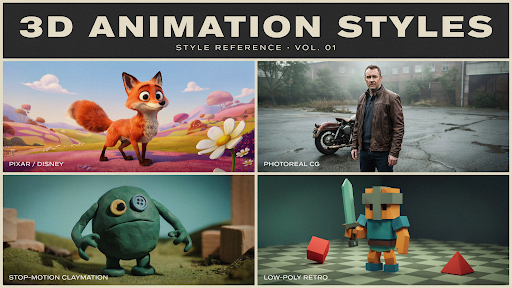
3D animation allows a camera to move around an object, enter it, separate its parts, or show angles that cannot be filmed easily.
Medical equipment, industrial machines, architecture, consumer products, automotive parts, and technology hardware often benefit from this approach.
A 3D explainer video company may show a device working inside the body, a machine being assembled, or a product that has not yet been manufactured. In each case, depth is carrying useful information.
The discussion around 2D vs 3D animation for marketing should begin there.
Use 2D when the story depends on people, emotion, or familiar situations. Use 3D when form, material, space, or mechanical movement matters.
A 3D treatment should reveal something. If it only makes the video shinier, the extra production may not be worth it.
Stop Motion Animation
Stop motion animation also puts the object at the center, but it uses real materials.
A product, paper shape, toy, plate of food, or clay figure is moved slightly and photographed. The process is repeated until the still images create motion.
Small imperfections give it character. A box may wobble as it opens. Food may slide in a way that feels playful rather than perfectly smooth.
That physical quality works well for food brands, toy campaigns, handmade products, and packaging launches.
Revisions can be awkward. If a label changes after filming, the scene may need to be rebuilt. Stop motion rewards careful planning because physical changes are not always easy to undo.
When the Message Is Mostly Information
A large number of business videos do not need a character or realistic product model.
They need to make something complicated easier to follow.
Motion Graphics
Motion graphics use icons, text, charts, diagrams, interface elements, and shapes to control how information appears.
A logistics firm may show the journey of an order. A finance company may explain a payment process. A cybersecurity brand may show how a threat moves through a network.
The viewer sees each part in order rather than facing one crowded screen.
This is one of the most common types of animation used in advertising, particularly for technology, healthcare, finance, and B2B services.
The best motion graphics are usually less busy than expected. Movement should direct attention. When every object spins or changes size at once, the video becomes harder to understand.
Whiteboard Animation
Whiteboard animation reveals an explanation gradually.
A drawing appears, then a note, then another idea connects to it. This slow build can help with lessons, compliance, training, nonprofit messages, and financial education.
The style feels dated when the drawings are generic. A lightbulb, handshake, dollar sign, and stick figure have appeared in too many videos already.
Artwork made for the actual subject changes the result.
Whiteboard work may not be the best animation style for business videos that need luxury, energy, or product beauty. For careful teaching, it can still be effective.
Typography Animation
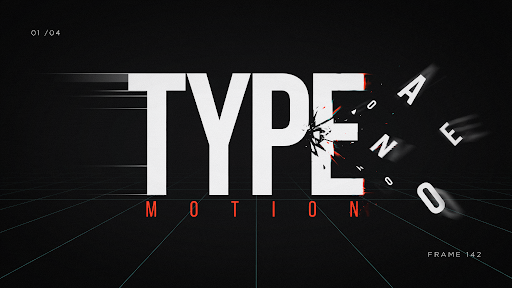
Typography animation makes the words themselves carry the visual.
Text changes size, position, spacing, and rhythm. Sound and timing give the message more weight.
It works well for trailers, event openers, social campaigns, lyric videos, launch announcements, and short advertisements.
The writing has to be strong. Animation cannot rescue a weak sentence.
Readability also matters. If the viewer has to chase every word across the screen, the visual treatment is getting in the way.
Mixed Media Works When Every Element Has a Job
Mixed media animation combines several approaches.
A brand film may begin with live action, add hand-drawn marks, use 3D for the product, and finish with animated text. Fashion, music, entertainment, and event campaigns use this style often.
The variety can feel fresh.
It can also become chaotic.
Live footage may add trust. 3D may explain the product. Motion graphics may handle numbers. Drawn elements may add humor. Each method should solve a particular part of the message.
Color, sound, framing, and editing rhythm help connect everything.
Without that shared direction, mixed media can look like several unrelated videos pushed together.
Software Usually Needs Interface Animation
Software presents a different challenge because the product is a series of actions on a screen.
A screenshot cannot show where someone clicks, what changes, or why the feature matters. Interface animation can guide the viewer through the key steps while removing distractions.
Motion graphics may explain what is happening behind the interface. A short character scene may introduce the problem before the software appears.
A SaaS explainer video company may combine all three approaches.
A homepage video should communicate the main promise. A feature walkthrough should explain one task. An onboarding video should help an existing user complete something.
Trying to cover every feature in one piece usually creates a rushed tour that nobody remembers.
For SaaS, simple explanation usually wins over visual spectacle.
Budget and Revisions Change the Decision
Anyone asking how to choose the right animation style should think about production realities as well as appearance.
Traditional animation can take longer because movement is drawn frame by frame. Stop motion may require parts of a set to be rebuilt when changes arrive. Detailed 3D needs modeling, texturing, rigging, lighting, and rendering before a finished scene exists.
Digital 2D and motion graphics can sometimes be easier to update, though complex character work may still require substantial revisions.
The platform matters too.
A large event screen can show more detail than a mobile advertisement. A longer YouTube video may allow slower pacing. A short social clip needs a simpler idea and quicker visual communication.
The right style sits where the message, audience, budget, schedule, and revision needs meet.
A Simple Way to Make the Choice
Start with what must be understood.
If viewers need to recognize a human situation, look at 2D or character animation.
If they need to examine a physical object or process, 3D may be the stronger choice.
If the video is about a system, workflow, or set of figures, motion graphics will often explain it more clearly.
Choose stop motion when the handmade feel adds value. Use whiteboard for patient teaching. Use typography when the message is short and the words are strong. Combine styles only when each method has a clear purpose.
That is the honest answer to choosing among the many animation formats. There is no single winner.
Final Words
The types of animation styles available today serve different jobs. Traditional, cutout, 2D, and character animation are useful when people and personality lead the story. Motion graphics, whiteboard work, and typography help organize information. 3D explains products, spaces, and physical movement, while stop motion gives objects a real handmade quality. Mixed media brings several techniques together when one approach is not enough.
Choose the style after the brief is clear. A fashionable visual treatment cannot repair a confused message, but the right production method can make a difficult idea much easier to understand.
