
AI explainer video creation is beneficial, but only if businesses stop considering it as a magic button. It allows you to draft quicker, test ideas sooner, generate preliminary images, experiment with voice-overs, and trim films into smaller versions without slowing down the entire team. That’s actually useful.
But here is the catch. AI can produce a video-looking thing pretty quickly. That does not mean the message is good. It does not mean the buyer cares. It does not mean the story is clear.
That is where brands still need a brain behind the tool.
What AI Explainer Video Creation Really Means
AI explainer video creation means using AI tools to help make parts of an explainer video. Sometimes that means writing a rough script. Sometimes it means building a storyboard, matching visuals, creating a draft voiceover, adding captions, editing clips, or turning one video into several shorter cuts.
It does not always mean the whole video is made by AI from beginning to end.
That is the better way to think about it. AI is not always the creator. Often, it is the assistant sitting next to the creator.
A good explainer video production company can use these tools to move faster, but the real job stays the same. Make the message clear. Keep the viewer interested. Say something the buyer actually needs to hear.
AI can speed up the work. It cannot decide the strategy for you.
Why Brands Are Using AI in Video Now
The pressure is simple. Teams need more video than before.
A product update needs a quick walkthrough. Sales wants a shorter clip for follow-up emails. Marketing needs a homepage video, then a social cut, then a vertical version, then a paid ad. Internal teams want training content. SaaS teams need onboarding videos after every major feature release.
That is a lot.
This is why AI video production is getting attention. It helps teams get a first version faster. Not perfect. Not always ready to publish. But enough to react to.
That matters because the blank page is often the slowest part of any video project.
The danger is obvious, too. If it becomes easy to make more videos, teams may start making more forgettable videos. Speed is only useful when the idea is still strong.
Scripts Can Start With AI, but They Need Editing
Automated script generation is one of the most useful parts of the whole thing.
You can paste in a product description, a messy brief, or a landing page, and the tool will give you a script outline. That is helpful. It gives the team something to argue with, fix, cut, and improve.
But most AI-generated video scripts have the same problem. They sound fine at first glance. Then you read them again and realize they could belong to almost any company.
Too clean. Too safe. Too general.
A proper explainer script needs more friction than that. It should know the customer’s problem. It should start faster. It should avoid lines that sound nice but say nothing. It should feel like someone actually understands the product and the person watching.
AI can give you a draft. A writer still has to make it sharper.
Character Animation Is Easier to Test Now
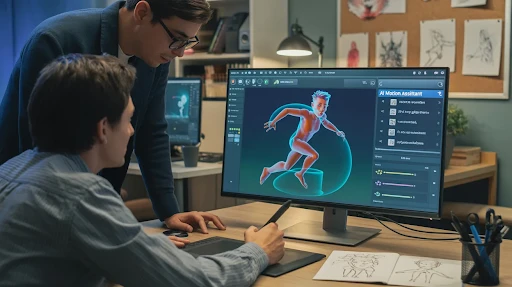
AI-powered character animation can help teams test scenes more quickly.
That is a real benefit. A brand can mock up a character, try a motion style, or see how a scene might play before spending time on full animation. For early concepts, this can save a lot of back-and-forth.
But movement alone is not the same as performance.
A character can wave, walk, smile, and still feel empty. The small choices matter. Timing. Pause. Expression. How the body reacts to the voiceover. How the scene breathes.
That is why a 2D explainer video company still has a role. Good 2D animation is not just about making things move. It is about making the movement feel intentional.
AI gets you closer to a rough idea. Direction makes it watchable.
AI Voices Are Better, but Not Always Better Enough
AI voice tools have improved fast. Voice synthesis can currently provide competent narration in a variety of tones, accents, and languages. This is great for drafts, internal explainers, and early testing.
It is also helpful when a team wants to hear a script before booking a voice actor.
But voice is one of those details people feel more than they analyze. If the narration sounds a little flat, the whole video starts to feel cheaper. The viewer may not say, “That voice is synthetic.” They may just stop trusting the piece a bit.
For low-stakes videos, an AI voice can work. For important customer-facing videos, a human voice still often feels warmer and more believable.
Use the shortcut where it makes sense. Do not use it where trust matters most.
Visual Matching Saves Time, but It Can Look Obvious
Automated visual selection sounds great on paper. The tool reads the script and pulls visuals that match the words.
For rough drafts, this is useful. It helps you see how a video might feel without building every frame from scratch.
The problem is that AI often picks the most obvious option.
Growth becomes an arrow.
Teamwork becomes people in a meeting.
Security becomes a lock icon.
Innovation becomes blue glowing lines.
You have seen these visuals before. So has everyone else.
For simple videos, that may be fine. For more technical products, it usually is not enough. A 3D explainer video company may need to create custom scenes, product details, internal views, or spatial movement that a generic library cannot provide.
AI can suggest a visual. It cannot always tell when the visual feels tired.
Editing Is Probably the Most Practical AI Use
This is where AI feels genuinely useful for busy teams.
Real-time video editing tools can trim pauses, add captions, clean audio, resize clips, suggest cuts, and turn one longer video into multiple shorter versions.
That saves time.
A single explainer may serve as a sales clip, a product-page cut, a vertical social video, a short commercial, or an internal training snippet. That type of repurposing used to take a lot longer.
Still, editing is not just cutting things faster. A good editor knows what to leave in. Sometimes the pause matters. Sometimes the extra second makes the idea land. Sometimes, the cleanest cut is not the best cut.
AI can make versions. A person has to choose the one that works.
Generative AI Needs a Better Brief Than Most Teams Give It

Generative AI performs better when the brief is specific. That sounds obvious, but it is where many teams mess up.
They write a vague prompt, get a vague result, and then complain that the tool feels generic.
The tool is not reading your mind.
A better brief should answer real questions:
- Who is watching?
- What do they already know?
- What are they confused about?
- What should they do after the video?
- What tone should the video avoid?
- What proof does the message need?
For software brands, a SaaS explainer video company can use AI to test more versions, faster. But the product story still needs to be clear first. Otherwise, every draft will just be a slightly different version of the same unclear idea.
The better the input, the less generic the output.
AI Is Changing the Workflow, Not Removing the Work
The old video process was usually slow and straightforward. Brief, script, storyboard, design, voiceover, animation, editing, revisions.
AI is making production workflows more flexible.
You can test three script angles before choosing one. You can hear draft voice-overs early. You can preview rough visuals before design starts. You can create cutdowns without rebuilding the whole project.
That is a good thing.
But a faster workflow does not remove decision-making. It makes decision-making more important. When everything moves quickly, weak ideas can spread quickly, too.
Someone still needs to stop and say, “This does not sound like us,” or “This part is boring,” or “The buyer will not understand this.”
That is not a tool problem. That is a judgment problem.
Frequently Asked Questions
Final Words
AI explainer video creation is worth using when it helps teams move faster without making the message weaker. It can handle scripts, voice testing, graphic drafts, editing, captioning, and cutdowns. It may let companies test concepts before investing additional time and money. However, it is not a substitute for sound strategy, great writing, or creative judgment.
The best outcomes are achieved when AI performs the initial lift while humans refine the final message into something particular, informative, and worth viewing.
